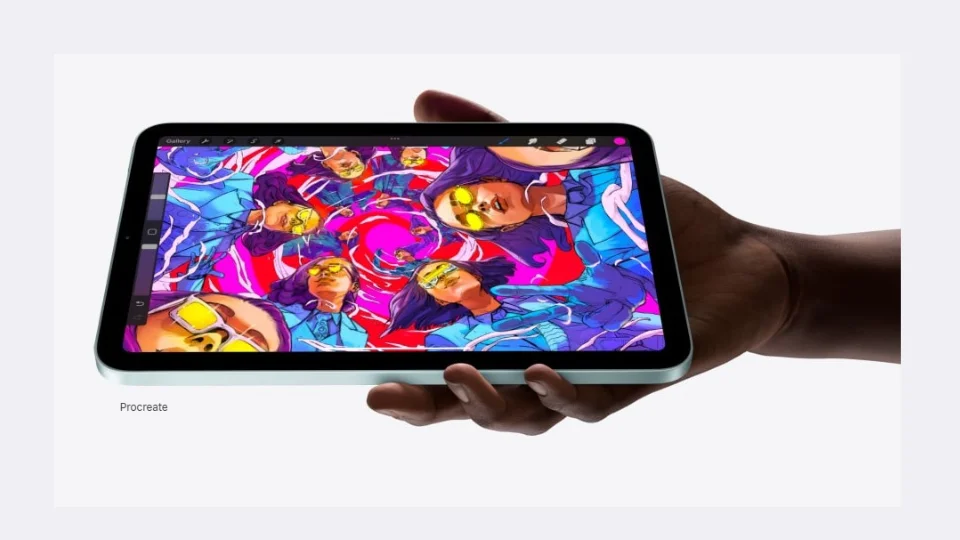
The iPad Mini has made a name for itself as a compact, portable, and powerful device that’s especially appealing to creative professionals and hobbyists. With its sleek design, impressive performance, and compatibility with the Apple Pencil (2nd generation), it seems like the perfect tool for on-the-go creatives. But as with any device, the iPad Mini has its strengths and weaknesses. Here’s a quick breakdown of the pros and cons of this small yet mighty tablet.
1. Compact and Lightweight
The standout feature of the iPad Mini is its compact size. At just 8.3 inches, it’s smaller and lighter than other iPads, making it a dream for creatives who need portability. Weighing only 0.65 pounds, it’s easy to carry around, slip into a bag, or even a large pocket. Whether you’re working in a cafe, on a plane, or traveling for work, the iPad Mini fits seamlessly into your creative routine without adding bulk.
2. Impressive Performance
Under the hood, the A15 Bionic chip powers the iPad Mini, delivering solid performance for demanding creative tasks. Whether you’re using design apps like Procreate, photo editing tools like Adobe Lightroom, or video editing software like LumaFusion, the iPad Mini handles everything with ease. The processor is fast and efficient, allowing you to multitask and run demanding apps without lag—essential for professional creatives.
3. Apple Pencil (2nd Generation) Support
The iPad Mini supports the Apple Pencil (2nd generation), making it an excellent tool for digital artists, illustrators, and designers. The Pencil offers precision, low latency, and a natural drawing experience, making it feel like you’re drawing on paper. Whether you’re sketching a quick idea or working on a detailed digital painting, the iPad Mini and Apple Pencil combo is incredibly responsive and intuitive. The Pencil also magnetically attaches to the side for easy storage and charging.
4. Stunning Display
Despite its small size, the iPad Mini has a Liquid Retina display that’s crisp, clear, and vibrant. The screen supports True Tone and P3 wide color, ensuring accurate color representation, which is essential for tasks like photo editing and digital design. The high resolution and laminated display reduce glare and improve visual clarity, making it a pleasure to work on for extended periods.
5. Seamless Apple Ecosystem Integration
As part of the Apple ecosystem, the iPad Mini works seamlessly with your other Apple devices. Whether it’s syncing with iCloud, AirDropping files, or using Handoff to transfer work between your Mac and iPad, the integration is smooth and efficient. This makes it easier for creatives who work across multiple devices to stay productive and keep their projects synchronized.
1. Small Screen Size
While the compact size is great for portability, the 8.3-inch screen can feel restrictive when working on larger projects or intricate details. For professional artists, designers, or photographers used to larger displays, the screen size may not be ideal for detailed work. Some users may find themselves constantly zooming in and out, which can be a hassle when working on complex designs or layouts.
2. Limited Storage Options
The iPad Mini offers only two storage options: 64GB and 256GB. For most casual users, this may be fine, but creatives who work with large media files—such as high-resolution images, video footage, or 3D models—may quickly run out of space. The lack of expandable storage or SD card support means you’ll need to rely on cloud storage or external devices, which can be an inconvenience for those who prefer to store everything locally.
3. No Face ID or Advanced Biometric Authentication
Unlike the iPad Pro, the iPad Mini doesn’t feature Face ID. Instead, it relies on Touch ID, which is embedded in the power button. While Touch ID is functional, it’s not as convenient as Face ID, especially if you’re used to unlocking devices with just a glance. This might be a minor inconvenience for users who prioritize quick access to their device.
4. No ProMotion Technology
The iPad Mini lacks ProMotion technology, which offers a 120Hz refresh rate for smoother scrolling and responsiveness. This feature, available on the iPad Pro, is particularly helpful for tasks like animation, video editing, and high-speed interactions. Without ProMotion, the iPad Mini’s display can feel less fluid when working on fast-moving projects, making it a slight disadvantage for some creative workflows.
5. Expensive Accessories
While the iPad Mini is reasonably priced for its capabilities, the necessary accessories—particularly the Apple Pencil (2nd generation) and the Smart Keyboard Folio—are sold separately. The cost of these accessories can quickly add up, especially if you’re planning to use the iPad Mini as a full creative workstation. For budget-conscious users, the extra expense of accessories may be a drawback.
The iPad Mini is a fantastic device for creatives who value portability without sacrificing power. Its compact design, impressive performance, support for the Apple Pencil, and vibrant display make it a great choice for sketching, note-taking, photo editing, and more. However, its small screen size, limited storage, and lack of ProMotion technology may be limiting factors for some professionals.
If you’re looking for a highly portable tablet that can handle your creative tasks on the go, the iPad Mini is an excellent option. But if you need a larger screen, more storage, or advanced features like ProMotion, you may want to consider other models, such as the iPad Pro or iPad Air. Ultimately, the iPad Mini strikes a perfect balance for mobile creatives who want both power and portability in a compact form.